
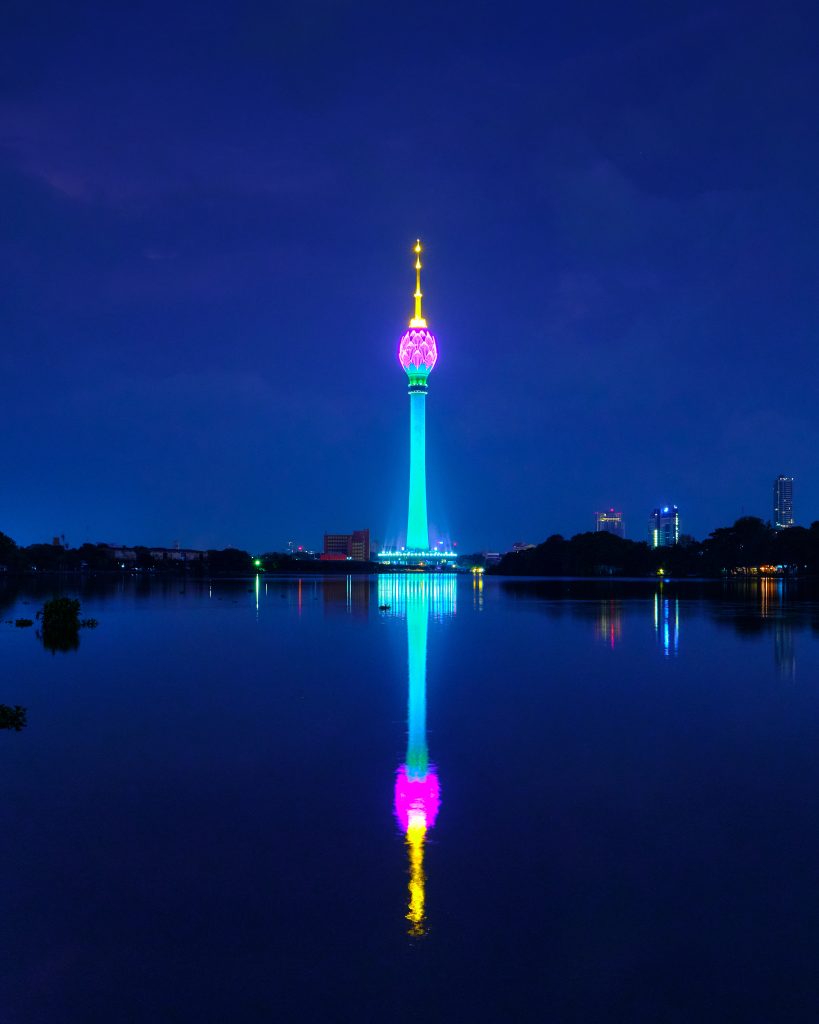
The Target: The Lotus Tower at Night
If your session left you feeling like you were staring at a futuristic sci-fi city or a giant glowing wand, your intuition was working perfectly! The target is a striking nighttime photograph of the brilliantly illuminated Lotus Tower in Sri Lanka, reflecting perfectly in the dark, still waters of Beira Lake.
What You Might Have Experienced:
Visuals & Shapes: You may have sketched a very strong, towering vertical line topped with a bulbous, blooming, or teardrop-like shape. Because of the perfect reflection in the water below, you might have even drawn a symmetrical, hourglass-like shape, or a vertical pole extending both up and down from a center horizon line. Colors are incredibly distinct here: you likely picked up on deep, dark, expansive blues contrasted with piercing neon greens, hot pinks, magentas, and electric yellows.
Sensory Data: Did you get impressions of “glowing,” “radiant,” “smooth,” or “glassy”? The stark contrast between the blinding artificial light and the dark, cool night air is a massive signal here. You might have also sensed the slick, flat, liquid surface of the lake, or perhaps an energetic, electric hum vibrating from the tower.
Concepts & Energetics: You could have tapped into the concept of a massive man-made structure, a beacon, or a transmitter reaching into the sky. The juxtaposition of a biological concept (a lotus flower) built out of synthetic, architectural materials (concrete, steel, and glass) is a fun paradox viewers often pick up on. Themes of “illumination,” “broadcasting,” “height,” and “stillness” are huge hits.
If your session notes feature a giant, neon-green asparagus wearing a pink crown while staring at its own reflection, you absolutely nailed it! Whether you accurately sketched the towering architecture, sensed the watery reflection, or simply picked up on the blinding, electric colors, phenomenal job. Time to power down and get some rest!
To ensure your submission is processed quickly, please merge your photos or documents into a single PDF file before uploading. Here are the easiest ways to do it:
If you already have multiple PDF files on your computer: