
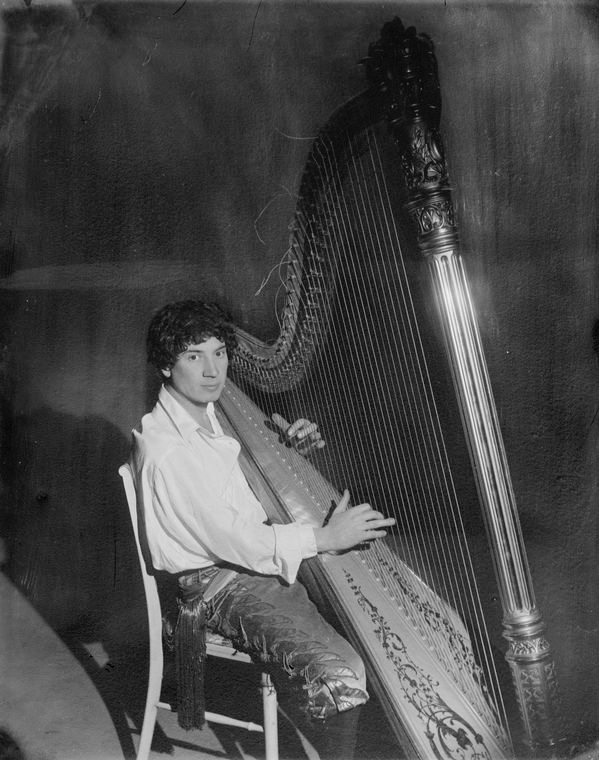
If your session felt like a bizarre tug-of-war between absolute chaos and serene beauty, you were perfectly tuned into the unique energy of this target! The target is a vintage, black-and-white photograph of the legendary comedian Harpo Marx calmly sitting and playing a large concert harp.
What You Might Have Experienced:
Visuals & Shapes: You may have sketched strong diagonal lines, a massive triangular or arched frame, and a series of tightly packed, parallel vertical lines representing the strings. You might have perceived a heavy, ornate pillar contrasting with a web of thin, delicate threads. Colors would likely be muted—monochrome, greyscale, or sepia from the photograph itself—though you might have also pulled the rich golds and polished wood tones of the physical instrument.
Sensory Data: Did you get impressions of “vibrating,” “plucking,” “tight tension,” or “resonating”? Auditory impressions are huge here—you might have “heard” sweeping, melodic musical notes or felt the physical vibration of taut strings. You might also have sensed the smooth, hard texture of polished wood and cold metal, alongside the softer textures of Harpo’s ruffled shirt and curly hair.
Concepts & Energetics: This target is a masterclass in duality. Harpo Marx was famous for his zany, hyperactive slapstick comedy and silent pantomime, yet he would regularly pause his wild antics to play incredibly beautiful, focused harp music. You may have picked up on this stark contrast: feelings of wild, silly, clownish energy abruptly shifting into intense focus, stillness, and classical grace. Themes of “performance,” “entertainment,” “antiquity,” and “silent music” are massive hits here.
If your session notes feature a silent trickster wrestling a giant, vibrating triangle, you deserve a standing ovation! Whether you accurately sketched the strings, heard the music, or just sensed the bizarre blend of chaotic comedy and artistic elegance, you did a spectacular job. Take a bow!
To ensure your submission is processed quickly, please merge your photos or documents into a single PDF file before uploading. Here are the easiest ways to do it:
If you already have multiple PDF files on your computer: