
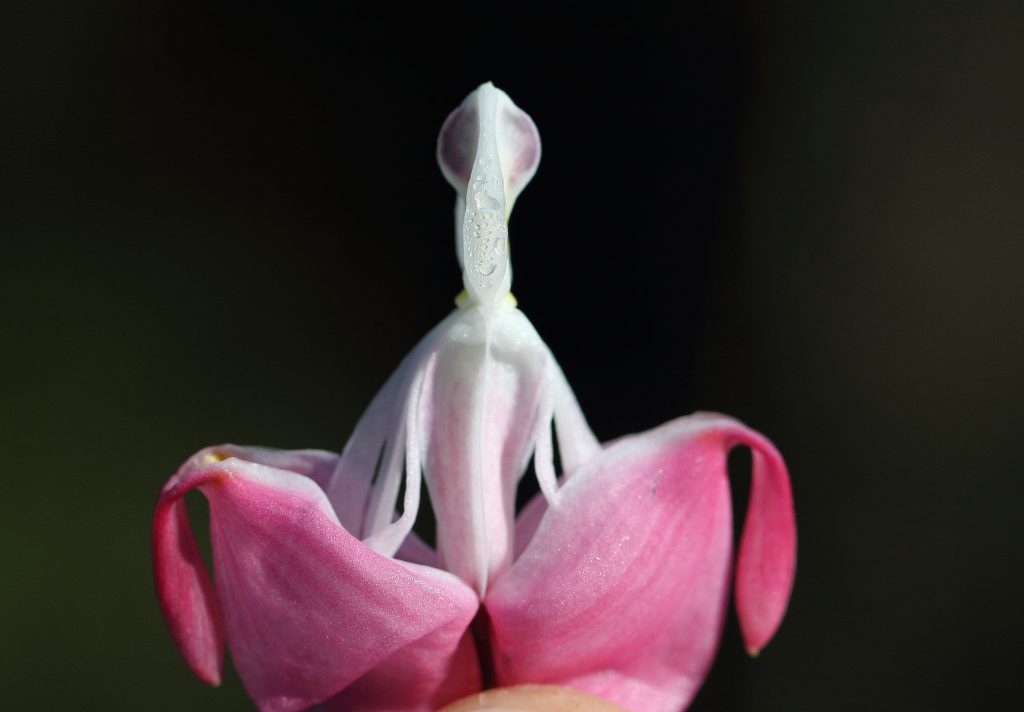
The Target: A Bleeding Heart Flower (Pulled Apart)
If your session left you feeling like you were looking at a tiny, delicate sculpture or something highly anatomical, your intuition was blooming perfectly! The target is a macro photograph of a Lamprocapnos spectabilis, commonly known as a bleeding heart flower, but specifically with its outer pink petals pulled apart to reveal the intricate, white inner structure.
What You Might Have Experienced:
Visuals & Shapes: You may have sketched strong, bilateral symmetry. The shapes here are highly suggestive—you might have drawn a central, vertical figure that looks almost human (a “lady” or a small white column) resting inside a larger, cup-like, or boat-like shape. Flowing, drooping, or curtain-like lines are also prominent. Colors that frequently emerge for this are stark contrasts: a deep, dark, empty background behind an incredibly vibrant, fleshy pink and a bright, pure white.
Sensory Data: Did you get impressions of “soft,” “delicate,” “damp,” or “smooth”? The sensory experience is highly botanical. You might have felt the velvety, fragile texture of flower petals or noticed tiny water droplets giving a feeling of moisture or morning dew. There might also be a subtle, sweet, or green floral scent.
Concepts & Energetics: This target is steeped in pareidolia (seeing familiar shapes in random objects). You might have tapped into the concept of a “lady in a bath,” “a person in a boat,” or even something vaguely anatomical, like a delicate bone structure or reproductive organs. The energetic signature here is one of unfolding, revealing, fragility, and a hidden interior being exposed.
If your session notes feature a tiny white ghost taking a bath in a pink tulip, you absolutely nailed it! Whether you accurately sketched the symmetrical botanical shapes, sensed the delicate textures, or picked up on the hidden “figure” inside the flower, magnificent work. Time to stop smelling the roses (or bleeding hearts) and relax!
To ensure your submission is processed quickly, please merge your photos or documents into a single PDF file before uploading. Here are the easiest ways to do it:
If you already have multiple PDF files on your computer: