
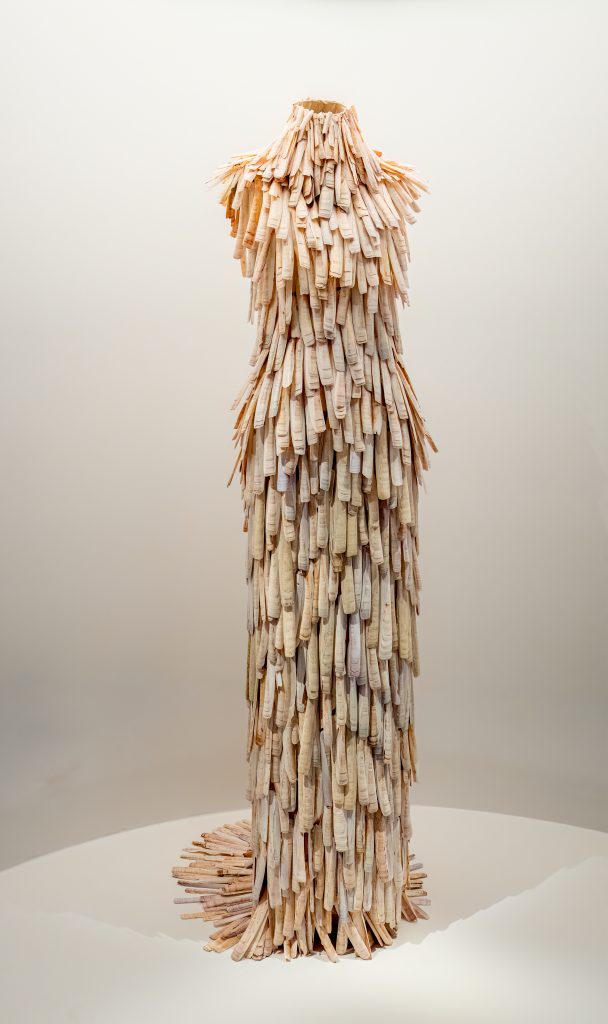
The Target: The Razor Clamshell Dress
If your session left you feeling like you were wearing a suit of armor made from the beach, your intuition was razor-sharp! The target is a striking photograph of Alexander McQueen’s famous razor clamshell dress, standing on a display pedestal as part of an exhibition.
What You Might Have Experienced:
Visuals & Shapes: You may have sketched a strong vertical, columnar shape that tapers slightly in the middle—an hourglass or a headless humanoid figure. The most overwhelming visual data would be the intense, repeating texture: hundreds of small, elongated, rectangular shapes overlapping like shingles, scales, or feathers flowing downward. Colors are relatively uniform but nuanced, featuring off-whites, creams, pale tans, and subtle iridescent hints of grey or pearlescent pink.
Sensory Data: Did you get impressions of “brittle,” “sharp,” “clinking,” or “heavy”? The sensory contrast here is fascinating. You might have felt the hard, calcified, sharp-edged texture of the thousands of individual shells. You could also have picked up on an auditory impression—the distinct, dry clicking or rustling sound these shells would make if the garment were in motion.
Concepts & Energetics: This target is a brilliant collision of concepts. You might have tapped into “fashion,” “artifice,” or “display” clashing with “organic,” “oceanic,” or “scavenged.” The dress represents nature being meticulously reorganized into a man-made, structured form. You might have also sensed the intense, meticulous labor required to construct it, or a feeling of something being fragile yet acting as a protective outer shell or armor.
If your session notes feature a headless mannequin wearing a heavy coat made of overlapping fingernails, you absolutely nailed it! Whether you accurately sketched the columnar shape, sensed the repetitive, hard texture, or picked up on the clash between high fashion and raw nature, magnificent work. Time to step off the runway and relax!
To ensure your submission is processed quickly, please merge your photos or documents into a single PDF file before uploading. Here are the easiest ways to do it:
If you already have multiple PDF files on your computer: