
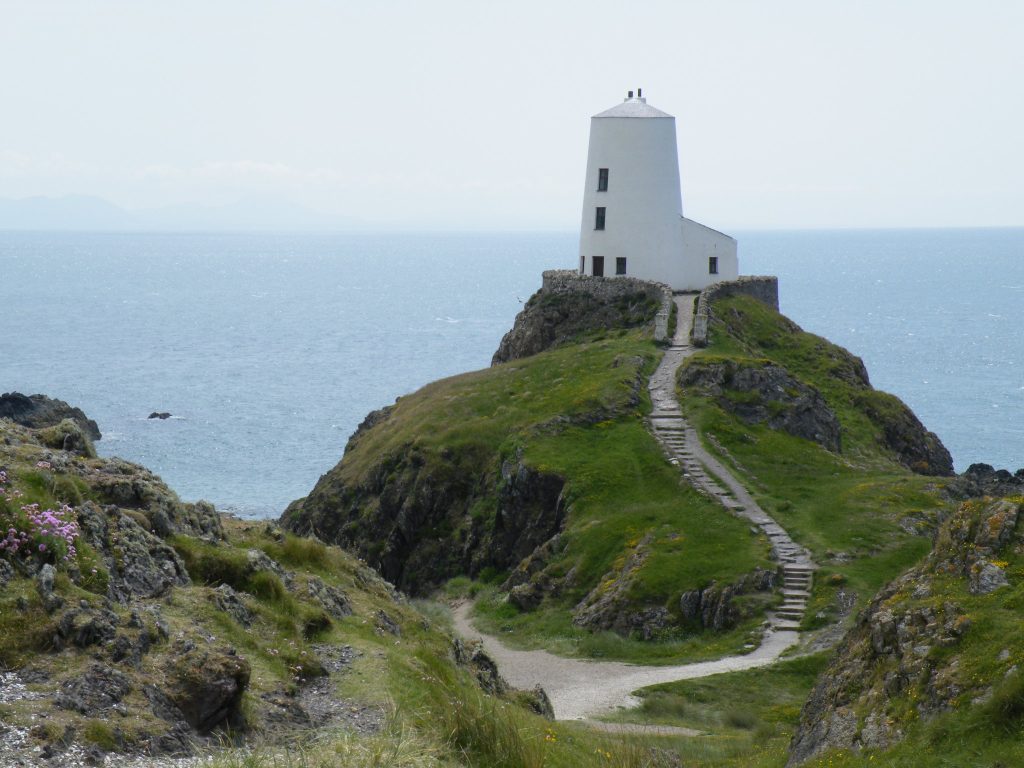
The Target: Tŵr Mawr Lighthouse
If your session left you feeling isolated on a windy precipice or staring out over a vast expanse of water, your intuition was pointing you exactly in the right direction! The target is a photograph of Tŵr Mawr Lighthouse, a striking, white, conical stone structure standing alone on a grassy, rocky peninsula in Wales, surrounded by the ocean.
What You Might Have Experienced:
Visuals & Shapes: You may have sketched a stark, vertical cylinder or cone resting on a very uneven, jagged horizontal base. A prominent visual feature is the winding path or steps leading up to the structure, which you might have drawn as a snake-like line or a series of ascending blocks. Colors that frequently emerge for this environment are bright, stark whites (the lighthouse), lush greens and rocky greys (the land), and expansive, hazy blues (the sea and sky).
Sensory Data: Did you get impressions of “windy,” “salty,” “bracing,” or “solid”? The sensory experience here is defined by exposure to the elements. You might have felt the firm, immovable nature of the stone architecture contrasting with the soft, yielding grass and the constant, rhythmic motion of the sea wind and waves.
Concepts & Energetics: You might have tapped into concepts of “isolation,” “guidance,” “warning,” or “a solitary sentinel.” Lighthouses have a very specific energetic signature—they are built to withstand harsh conditions while projecting safety and observation outward. You might have felt a sense of standing on the edge of the world, a boundary between solid earth and the vast unknown of the ocean. The winding path could also have triggered concepts of a journey or a pilgrimage to a high place.
If your session notes feature a giant salt shaker sitting on a mossy rock pile by the sea, you absolutely nailed it! Whether you accurately sketched the tapering tower, sensed the winding pathway, or simply picked up on the isolated, watchful energy of the target, fantastic work. It’s time to come in from the cold and wind and relax!
To ensure your submission is processed quickly, please merge your photos or documents into a single PDF file before uploading. Here are the easiest ways to do it:
If you already have multiple PDF files on your computer: