
Welcome to the feedback for your remote viewing session!
The Target: The Benagil Sea Cave
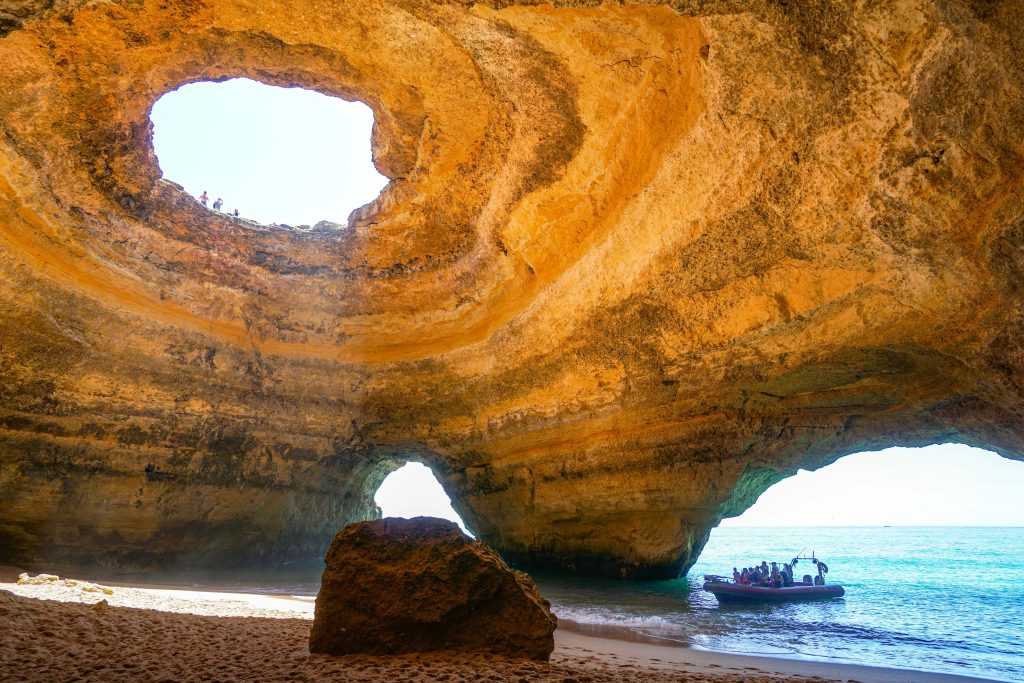
If your session left you feeling like you were standing in a giant, echoing dome, or perhaps gazing into a glowing gateway to another dimension, your intuition was working overtime! The target is a photograph from inside the breathtaking Benagil Sea Cave in Portugal, showing its famous natural skylight overhead, a sandy beach, and the ocean flowing in through massive arches.
What You Might Have Experienced:
Visuals & Shapes: You may have sketched large, sweeping curves, a massive hollow structure, and distinct circles or holes. A very strong visual here is the stark contrast between the dark, enclosed space and the blinding light pouring in from the circular opening above. For many viewers, this perfectly circular skylight or the massive sea archway can easily translate visually as a glowing portal, a stargate, or a dimensional tear. Colors that frequently come through are warm, golden-yellows and oranges from the rock, clashing beautifully with the bright, cool blues and turquoises of the sky and ocean water.
Sensory Data: Did you get impressions of “echoing,” “damp,” “gritty,” or “salty”? The sensory experience is rich: you might have felt the rough, layered texture of the limestone walls, the soft sand, or the cool, moving water. You could have also heard the rhythmic sound of waves crashing and echoing within a confined space, which can sometimes be interpreted as the humming vibration or energy of a cosmic doorway.
Concepts & Energetics: You might have tapped into concepts of “enclosure,” “erosion,” or a “hidden sanctuary.” But with this target, the energetics of a “threshold” or “crossing over” are huge. The duality of being both inside (a cave) and outside (open to the sky and sea) often triggers the concept of a portal—a liminal space connecting two entirely different worlds. You might have felt a pulling sensation, a transition between elements (earth to water, dark to light), or the awe of standing before a massive, natural gateway.
If your session notes feature a sandy stargate, a giant cosmic eye looking down, or a rocky donut acting as a dimensional doorway, you absolutely nailed it! Whether you accurately sketched the circular skylight, sensed the echoing clash of water and rock, or just picked up on the threshold energy of a portal, phenomenal work. Time to step back into this dimension and relax!
To ensure your submission is processed quickly, please merge your photos or documents into a single PDF file before uploading. Here are the easiest ways to do it:
If you already have multiple PDF files on your computer: